I can finish a run, sync my Garmin and see the familiar summary within minutes: distance, time, pace, heart rate, cadence, a map and a few tidy graphs.
Useful? Absolutely.
The whole run? Not even close.
Underneath that summary sits a small file with a .FIT extension. I ignored those files for years. Now, at 67, I’ve become the sort of late-blooming running-data nerd who wants to know what happened second by second, which numbers deserve trust and which ones should be shown the door.
That still doesn’t mean every run has to become an investigation. I genuinely enjoy running. The data are a fascinating second layer, not the reason I put on my shoes or the judge that decides whether a run was worthwhile.
But when I ask an AI running coach to assess a workout, the FIT file gives us much better evidence than a screenshot alone.
What Is a Garmin FIT File in Plain English?
FIT stands for Flexible and Interoperable Data Transfer. Garmin describes it as a compact protocol for storing and sharing information from sport, fitness and health devices. Sensors measure things such as heart rate, speed, pace or power, and a watch or other device can save those readings into a FIT file.
In plainer language, a Garmin FIT activity file is the machine-readable record underneath the activity summary.
It isn’t a photograph of the finished dashboard. It is closer to the event log and timeline used to build that dashboard.
Garmin’s FIT overview explains that the format was designed to move device data across platforms. Its technical guide to decoding activity files also shows why one file can contain several kinds of messages rather than one neat row of totals.
The activity summary tells me how the run ended. The FIT file lets me examine how it unfolded.
The Four FIT Layers I Care About Most
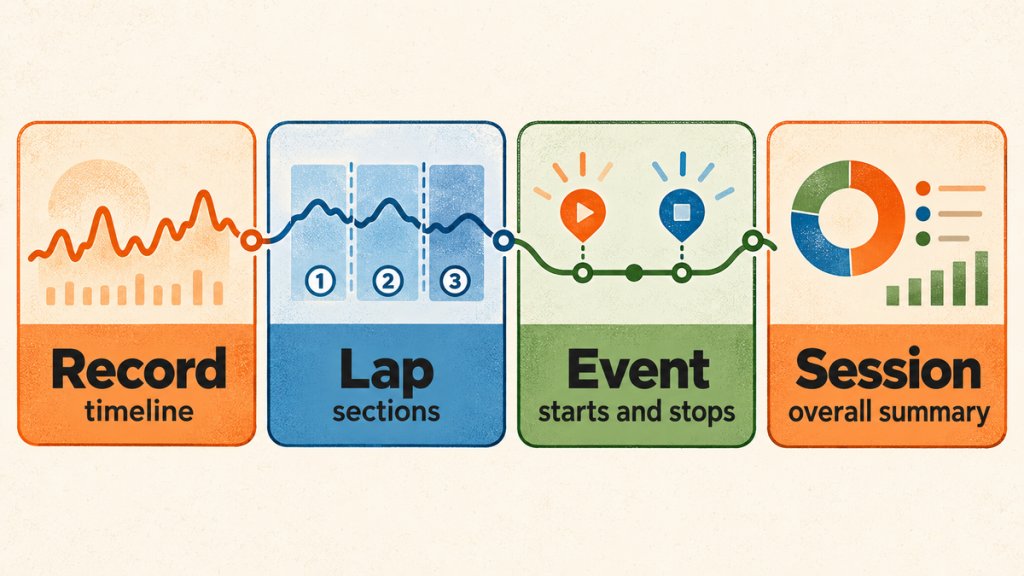
A FIT activity file can contain more than these four layers, and the exact contents depend on the watch, sensors and settings used. For my running analysis, these are the useful basics.
1. Record Messages: The Timeline
Record messages are the stream of timestamped measurements collected during the activity. Depending on the device and sensors, that can include distance, speed, heart rate, cadence, elevation and GPS position.
This is where I can ask questions that a whole-run average hides. Did heart rate rise smoothly? Did cadence change when pace changed? Was the strange number a brief spike, a long dropout or something that matched the rest of the run?
2. Lap Messages: The Sections
Lap messages summarize chunks of the activity. A lap may be created by auto lap, a manual button press or a structured workout step. They can be helpful, but a lap is not automatically the same thing as the coaching purpose of a section.
If my warm-up, easy running, controlled block and cooldown are mixed inside a kilometre lap, the kilometre average may be accurate and still answer the wrong question.
3. Event Messages: Starts, Stops and Pauses
Event messages help identify when the timer started, stopped or resumed. That matters when moving time, elapsed time, auto-pause and brief interruptions begin telling slightly different stories.
Garmin’s guidance on elapsed, timer and moving durations is a useful reminder that these are not interchangeable labels. A traffic light, a water stop or a deliberate walk can change the summary without changing the purpose of the workout.
4. Session Messages: The Big Summary
The session layer contains the totals most runners recognize: overall time, distance and summary metrics. It is useful, but it is also the broadest view.
I think of the session summary as the cover of the book. The record, lap and event messages are some of the pages inside.
What a FIT File Can Tell My AI Running Coach
A properly decoded FIT file can give CoachChat objective evidence about what the device recorded. That may include:
- A timestamped pace or speed trace
- Heart-rate readings from the selected source
- Cadence during actual running
- Distance accumulation
- Laps and workout sections
- Pauses, restarts and other timer events
- Elevation and location, when recorded
- Device and sensor information
That detail supports better questions. Instead of asking, “Was my average heart rate okay?” I can ask whether the heart-rate trace was believable during the intended work section. Instead of assuming that a cadence average describes my form, I can separate running from walking and stops.
My Training Metrics Made Simple guide explains the common numbers in ordinary language. The FIT file adds the timeline that helps decide when those numbers are actually interpretable.
What the FIT File Cannot Know
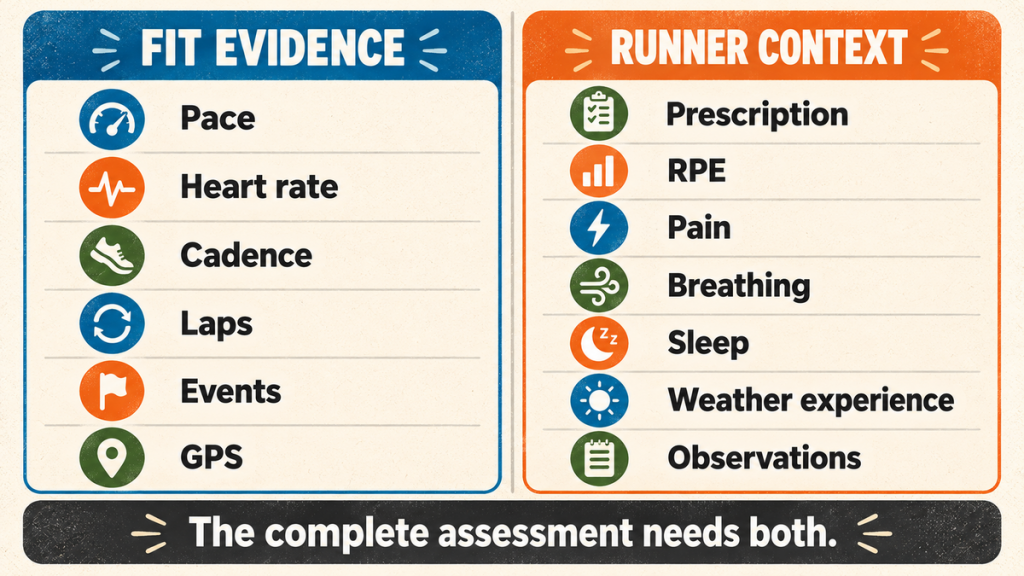
This is where my enthusiasm for the file needs a leash.
The FIT file can show that I slowed down. It usually can’t tell us why.
It doesn’t know that I walked an incline on purpose, crossed a busy road, stopped to retie a lace, ran while chatting with a friend or shortened my stride because something felt odd. It doesn’t know how I slept, what the humidity felt like to me, whether I was anxious before the run or whether an ache improved as I moved.
It also doesn’t automatically know the workout’s purpose. A slow comeback run can be completely successful. A fast easy run can be poorly controlled. Pace becomes meaningful only after we know what I was trying to do.
That is why my post-run debrief adds the prescription, RPE, breathing, readiness, pain, weather, terrain, footwear, observations and questions for the coach. The watch contributes evidence. I contribute the experience.
The FIT file records what the sensors saw. It does not record what the runner knew.
A FIT File Can Preserve Bad Data Perfectly
Detailed data are not automatically trustworthy data.
During one BlackToe Week 4 easy-endurance run, the file preserved a heart-rate trace that was clearly wrong at the beginning. My pace and cadence had shifted into ordinary running values, around 8:00 to 8:30 per kilometre and roughly 160 steps per minute, while the chest strap was still reporting heart rate in the 50s and then slowly climbing through to implausibly high values.
The file did its job. It recorded what the sensor sent.
The sensor was the problem.
The 45-minute session still contained useful evidence. I completed the prescribed easy-endurance duration at an overall RPE of 3 to 4. Running cadence stayed mainly around 159 to 164 steps per minute once I was moving. I could run and talk without gasping. A mid-back tightness that began at 3 out of 10 was 2 out of 10 afterward.
The coach assessment therefore treated the opening heart-rate data and the whole-session average as low confidence. It did not use that run to revise my zones or calculate formal aerobic drift. It used the credible parts of the FIT evidence alongside the original prescription and my report.
That distinction matters. A mathematically correct average can still be practically useless when the signal underneath it is broken. My article about when to adjust a running plan applies the same rule at the training level: change only what the credible evidence requires.
Can ChatGPT Read a Garmin FIT File Directly?
Sometimes the answer will depend on the ChatGPT environment, tools and file support available. A FIT file is a specialized binary format, not an ordinary text document.
OpenAI’s current file-upload guidance says ChatGPT can work with common documents, spreadsheets, presentations and other supported files. It does not specifically promise that every ChatGPT experience will decode every raw .FIT file correctly.
I don’t want my coaching workflow to depend on a hopeful upload.
My Plus50Fit FIT Tool decodes the file locally on my computer and exports structured, readable evidence. That includes a lossless record timeline, session and lap summaries, events, sensor-quality flags and the runner context the FIT file doesn’t contain. CSV and JSON are much easier to inspect, compare and audit than an unexplained binary blob.
Garmin also provides an official FIT CSV Tool for developers and technically inclined users. My project is trying to build a more runner-friendly bridge around the same basic need: decode first, then interpret.
FIT File Versus Activity Summary
I use both. They simply do different jobs.
The Activity Summary Is Excellent for Orientation
A Garmin or Strava summary quickly answers the obvious questions: how far, how long, how fast and what the broad trace looked like. It is convenient, visual and often all I need after an ordinary run.
The FIT File Is Better for Investigation
When something looks odd, the underlying timeline matters. The FIT file can help separate running from walking, identify a pause, compare workout sections and expose a sensor trace that does not agree with pace or cadence.
Neither One Supplies the Runner’s Story
Both can miss the prescription, RPE, symptoms, breathing, weather experience and the reason a decision was made. That is the input asymmetry at the centre of my AI running coach experiment.
I have already seen what happens when confident race-prediction systems work from their own assumptions. The lesson is not that summaries or predictions are useless. It is that we should understand the question each tool is actually equipped to answer.
The Transparent Chain I’m Building
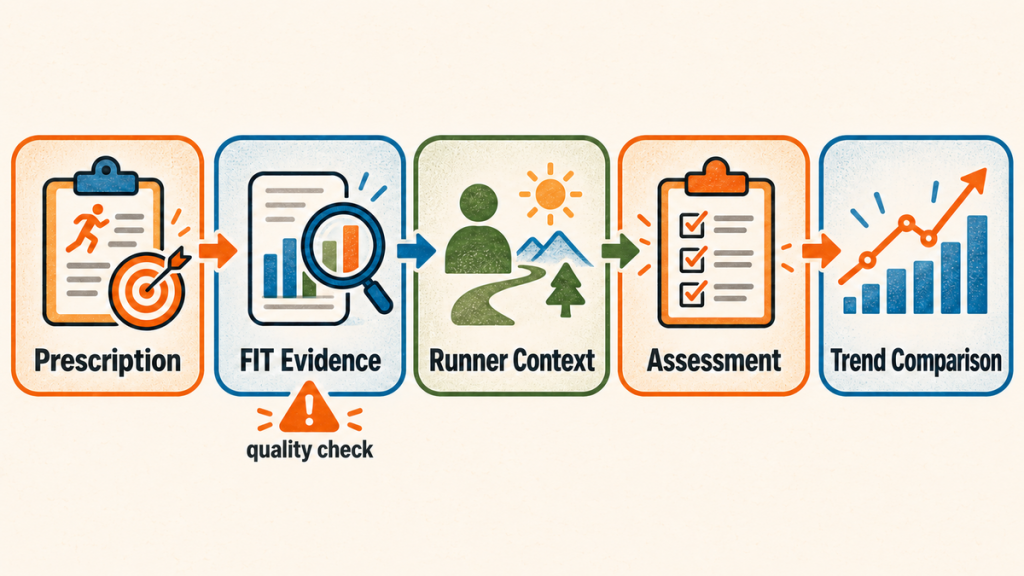
My full workflow is:
Coach prescription → Garmin FIT evidence → runner context → post-run assessment → multi-run trend comparison
Each stage has one job.
- Coach prescription: What was assigned, at what effort, and for what purpose?
- Garmin FIT evidence: What did the device and sensors record?
- Runner context: What did I experience that the file could not know?
- Post-run assessment: Which evidence was credible, and did the workout achieve its purpose?
- Multi-run comparison: Is this one unusual day or a repeatable change across comparable runs?
The run ID connects those layers so the assessment does not quietly compare the wrong prescription with the wrong activity. That may sound fussy until a training block contains several similar easy runs, altered sessions and sensor mishaps.
My cornerstone article, How I Use ChatGPT as My AI Running Coach at 67, explains the whole experiment. The FIT file is one link in that chain, not the coach, not the verdict and certainly not the runner.
Where the Plus50Fit Tools Might Go
The FIT Tool and Run Compare are currently Python applications I use on my own computer.
The FIT Tool combines Garmin activity evidence with the prescribed workout, RPE, weather, terrain, sleep, readiness, pain, footwear, observations and coach questions. Run Compare reads those run folders and looks across comparable sessions: pace at approximately the same heart rate, heart rate at approximately the same pace, pace-heart-rate-cadence relationships, aerobic efficiency, workout halves, chronological trends and environmental cautions.
The experiment may eventually produce free downloadable Plus50Fit FIT Tools for Windows, with local processing, sample files and a quick-start guide. That is a possibility, not a promised release. Reader demand, testing beyond my computer, installation guidance, digital signing, privacy, disclaimers, licensing, maintenance and support all need honest answers first.
The important principle is already usable without my software: preserve the original workout, inspect the evidence, add the runner’s context and compare like with like.
Data Are the Second Layer, Not the Run
I enjoy this stuff far more than I expected.
I can spend a ridiculous amount of time looking at pace, heart rate and cadence, then testing whether two runs are comparable enough to compare at all. That is fun for me. It isn’t a requirement for being a real runner.
I also haven’t run with my Shokz or phone in months. I expect I’ll carry them again, especially the phone as the runs get longer, but lately I’ve enjoyed going out with less noise and letting the run happen before I take it apart.
Those two versions of me aren’t in conflict.
One runs.
The other gets home, opens the files and starts asking questions.
The Takeaway
A Garmin FIT file is the detailed activity record underneath the screen summary. It can preserve the timeline, laps, events and sensor readings that help an AI running coach assess what actually happened.
It can also preserve a bad sensor reading with complete accuracy.
That is why my process does not stop at decoding the file. The workout prescription tells us what the run was meant to do. The runner report explains what the device could not know. The assessment decides which evidence deserves weight. The longer record tells us whether anything is changing.
I think that is where the FIT file becomes genuinely useful. Not as a pile of numbers to obey, but as one honest witness in a larger conversation.
Frequently Asked Questions
What does FIT stand for?
FIT stands for Flexible and Interoperable Data Transfer. Garmin designed the protocol to store and share information from sport, fitness and health devices.
What data are in a Garmin FIT activity file?
The exact contents vary by device, activity, sensors and settings. A running activity file may contain timestamped pace or speed, distance, heart rate, cadence, GPS, elevation, laps, timer events, session summaries and device information.
Is a FIT file more accurate than Garmin Connect or Strava?
Not automatically. The FIT file is closer to the original recorded evidence, while the apps summarize and interpret it. If a sensor sends bad data, the FIT file may preserve those bad readings faithfully. Detail and accuracy are not the same thing.
Can ChatGPT analyze a Garmin FIT file?
It depends on the ChatGPT environment and available tools. A reliable approach is to decode the binary FIT file into readable CSV or JSON, preserve the timeline and events, then provide the workout prescription and runner context alongside it.
Does a FIT file include RPE, pain, sleep and weather?
Usually not in the form needed for coaching. Some device or platform fields may include related information, but the runner still needs to supply subjective effort, symptoms, sleep, readiness, terrain experience, footwear and other context that changes the meaning of the run.
How do I open a Garmin FIT file?
A FIT file is binary, so an ordinary text editor will not present it as a useful table. A compatible fitness platform or FIT decoder can open it. Garmin’s FIT CSV Tool can convert the contents into readable text, while runner-focused software can organize selected messages into CSV or JSON for analysis.
Is it safe to upload a FIT file?
Treat it as personal data. Activity files may contain routes, locations, timestamps, device information and health-related measurements. Review what you are sharing, use privacy controls appropriate to the service and avoid uploading files that do not belong to you.
AI DISCLOSURE
I developed this article with AI assistance for current research, source checking, structure and drafting. AI is also part of the coaching process being examined. The running experience, opinions, decisions and final editorial judgment are my own.
SAFETY AND PRIVACY DISCLAIMER
This article describes my personal training experiment and data workflow. It is not medical advice, diagnosis, rehabilitation guidance or an individualized training prescription. AI cannot examine a runner or replace an appropriate healthcare professional or experienced human coach. Stop exercise and seek qualified help for severe, worsening, unusual or movement-altering symptoms, or whenever you are concerned about your health. FIT files may contain routes, locations, timestamps and health-related data. Review what you share and where you share it. Garmin is not affiliated with or responsible for the Plus50Fit tools or this experiment.